
WhatsApp Template Guide
WhatsApp templates are pre-approved, structured message formats used for outbound or business-initiated communication.
Templates allow businesses to send notifications, authentication codes, marketing messages, and transactional updates outside the 24-hour customer-service window.
A WhatsApp template can include several structured components:
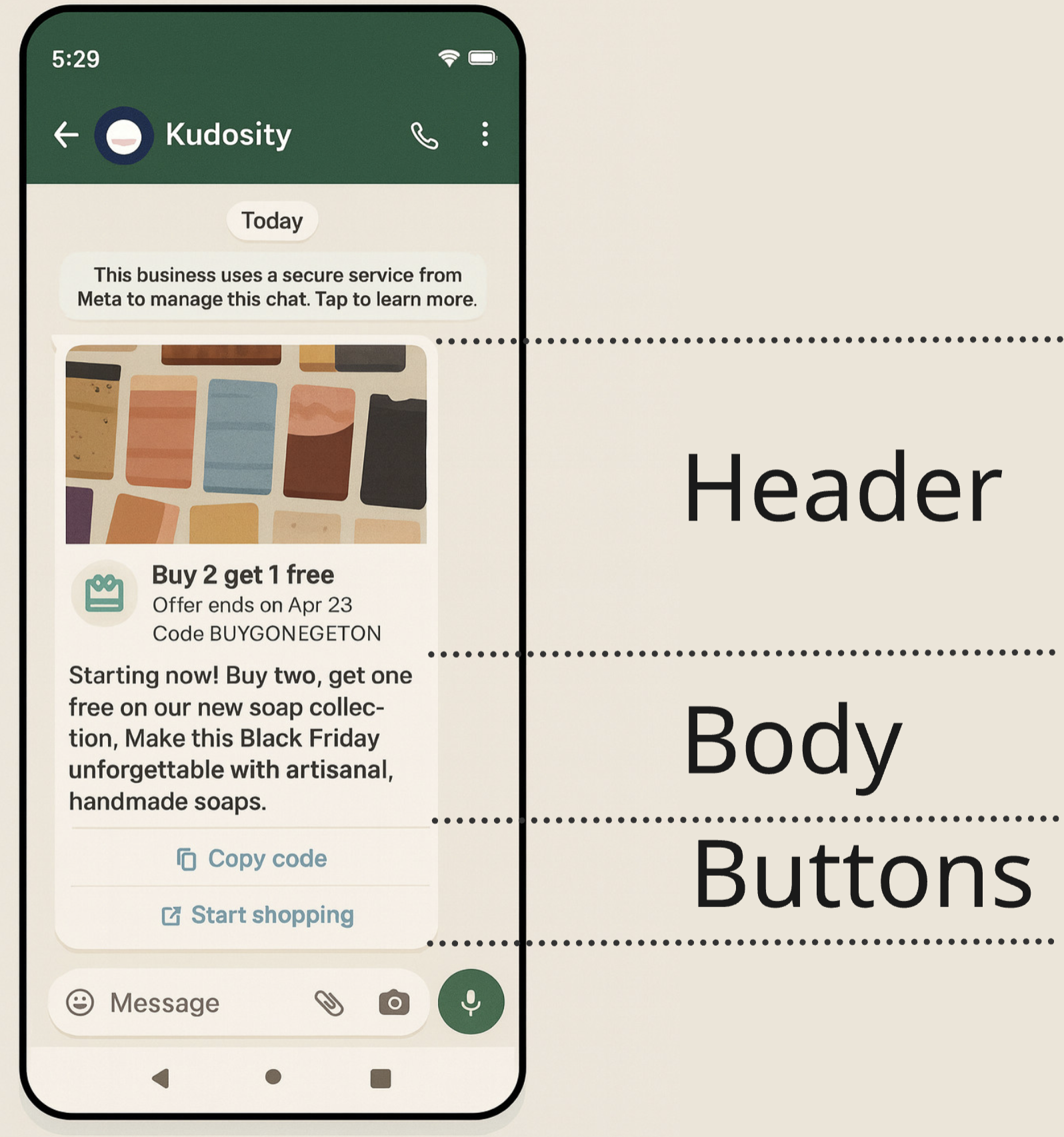
- Header – optional; may contain text or rich media (image, video, or document)
- Body – required; contains the main message text and dynamic placeholders
- Footer – optional; short supporting text
- Buttons – optional; can be quick replies or URL buttons
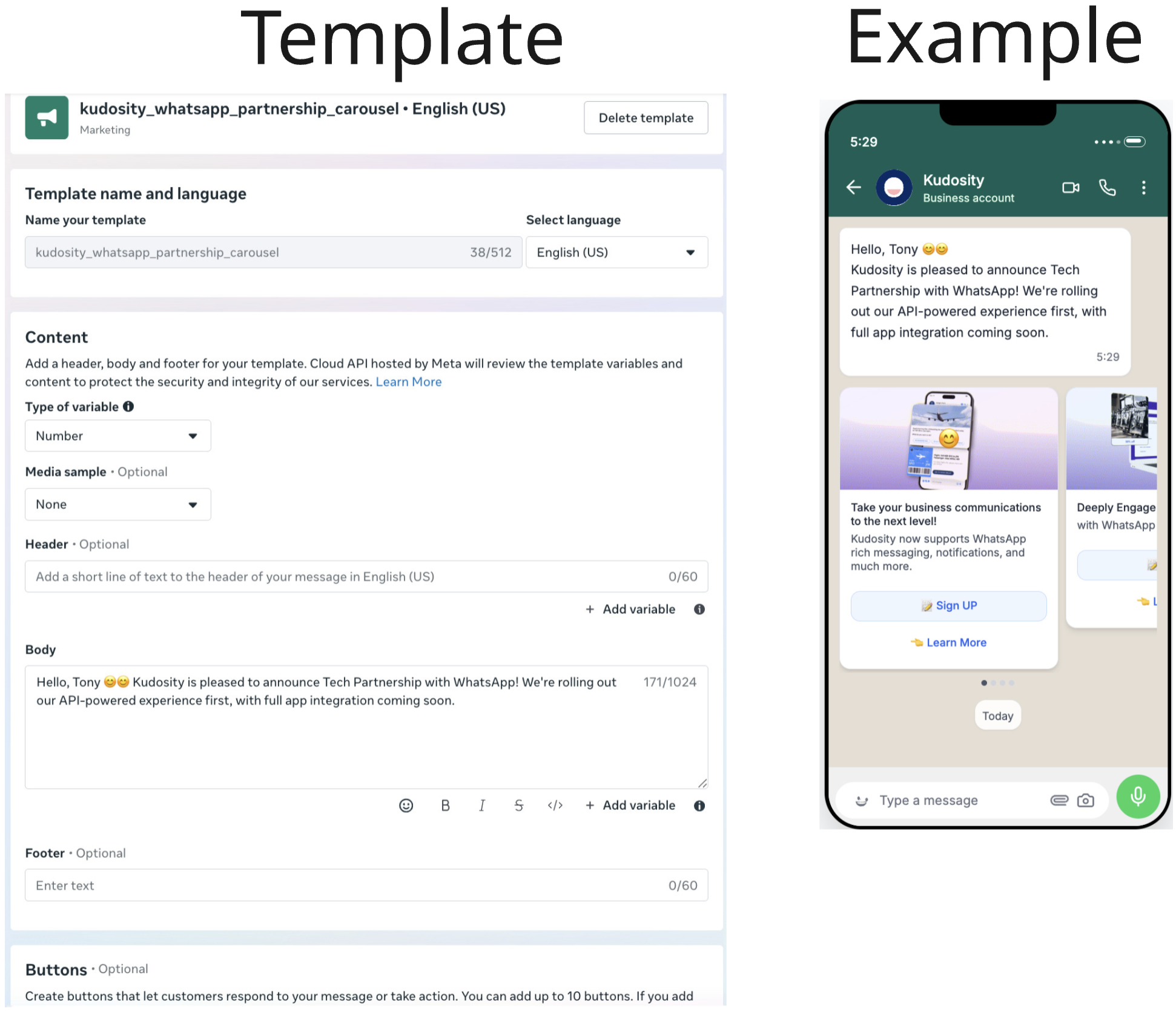
- Carousel Cards (Marketing only) – optional; interactive rich-media cards
Visual Breakdown of a WhatsApp Template
This visual shows the standard layout of a WhatsApp template message as it appears to the end user.
It helps developers understand where template components render and how they map to template structure.
Template Categories
| Category | Technical Format | Can Initiate Conversations | Media Support | Notes |
|---|---|---|---|---|
| Marketing | custom | Yes | Yes (images, video, documents, carousels) | Used for promotional outbound messaging |
| Utility | template | Yes | No | Used for non‑promotional, transactional updates |
| Authentication | template | Yes | No | Strict OTP formatting rules |
| Service | text | No | Yes | Only allowed inside 24‑hour window |
Marketing Templates
Technical format: content_type: "custom"
Marketing templates include any message that promotes, advertises, or encourages engagement.
These require a Custom Template because Meta requires marketing messages to use the structured component-based format.
Structure
Marketing templates may include:
- Header (text, image, video, or document)
- Body (with or without dynamic parameters)
- Footer (optional)
- Buttons (quick reply or URL)
- Carousels (multiple cards)
Example (Advanced Marketing Template)
Carousels are advanced Meta functionality that requires you to upload the images to Meta and register the template through the API. How to do this will be covered in another section.
{
"sender": "1111111",
"recipient": "+2222222",
"content_type": "custom",
"content": {
"custom": {
"type": "template",
"template": {
"name": "kudosity_whatsapp_partnership_carousel",
"language": {
"code": "en_US",
"policy": "deterministic"
},
"components": [
{
"type": "body",
"parameters": []
},
{
"type": "carousel",
"cards": [
{
"card_index": "0",
"components": [
{
"type": "header",
"parameters": [
{
"type": "video",
"video": {
"link": "https://storage.googleapis.com/waba-images/CAROUSEL_1.mp4"
}
}
]
},
{
"type": "body",
"parameters": []
},
{
"type": "button",
"index": "0",
"sub_type": "quick_reply"
},
{
"type": "button",
"index": "1",
"sub_type": "URL",
"parameters": [
{
"type": "text",
"text": "https://kudosity.com/products/messaging/whatsapp"
}
]
}
]
},
{
"card_index": "1",
"components": [
{
"type": "header",
"parameters": [
{
"type": "video",
"video": {
"link": "https://storage.googleapis.com/waba-images/CAROUSEL_2.mp4"
}
}
]
},
{
"type": "body",
"parameters": []
},
{
"type": "button",
"index": "0",
"sub_type": "quick_reply"
},
{
"type": "button",
"index": "1",
"sub_type": "URL",
"parameters": [
{
"type": "text",
"text": "https://kudosity.com/products/messaging/whatsapp"
}
]
}
]
},
{
"card_index": "2",
"components": [
{
"type": "header",
"parameters": [
{
"type": "video",
"video": {
"link": "https://storage.googleapis.com/waba-images/CAROUSEL_3.mp4"
}
}
]
},
{
"type": "body",
"parameters": []
},
{
"type": "button",
"index": "0",
"sub_type": "quick_reply"
},
{
"type": "button",
"index": "1",
"sub_type": "URL",
"parameters": [
{
"type": "text",
"text": "https://kudosity.com/products/messaging/whatsapp"
}
]
}
]
},
{
"card_index": "3",
"components": [
{
"type": "header",
"parameters": [
{
"type": "video",
"video": {
"link": "https://storage.googleapis.com/waba-images/CAROUSEL_4.mp4"
}
}
]
},
{
"type": "body",
"parameters": []
},
{
"type": "button",
"index": "0",
"sub_type": "quick_reply"
},
{
"type": "button",
"index": "1",
"sub_type": "URL",
"parameters": [
{
"type": "text",
"text": "https://kudosity.com/products/messaging/whatsapp"
}
]
}
]
}
]
}
]
}
}
},
"message_ref": "ref--kudosity-carousel-message-lab"
}Utility Templates
Technical format: content_type: "template"
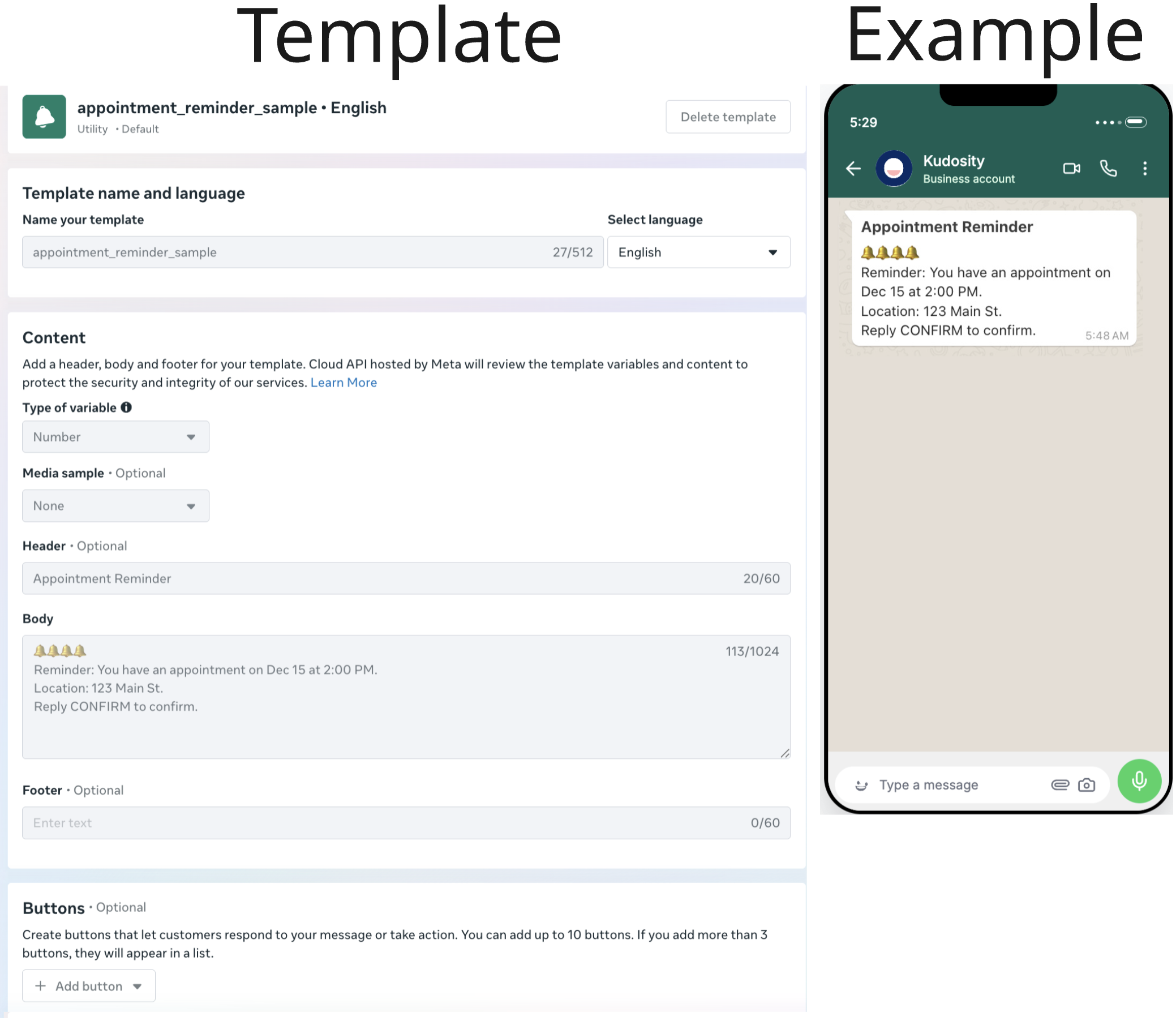
Utility templates are transactional and non‑promotional.
They must relate to an existing request, transaction, or account state.
These templates:
- Are text-only
- Support dynamic placeholders
- Cannot include media or buttons
- Must not contain promotional language
Example (Utility Template)
{
    "sender": "1111111",
    "recipient": "+222222222",
    "content_type": "template",
    "content": {
        "template": {
            "name": "appointment_reminder_sample",
            "locale": "en"
        }
    },
    "message_ref": "ref-appointment-reminder-sample-message-lab"
}
Authentication Templates
Technical format: content_type: "custom"
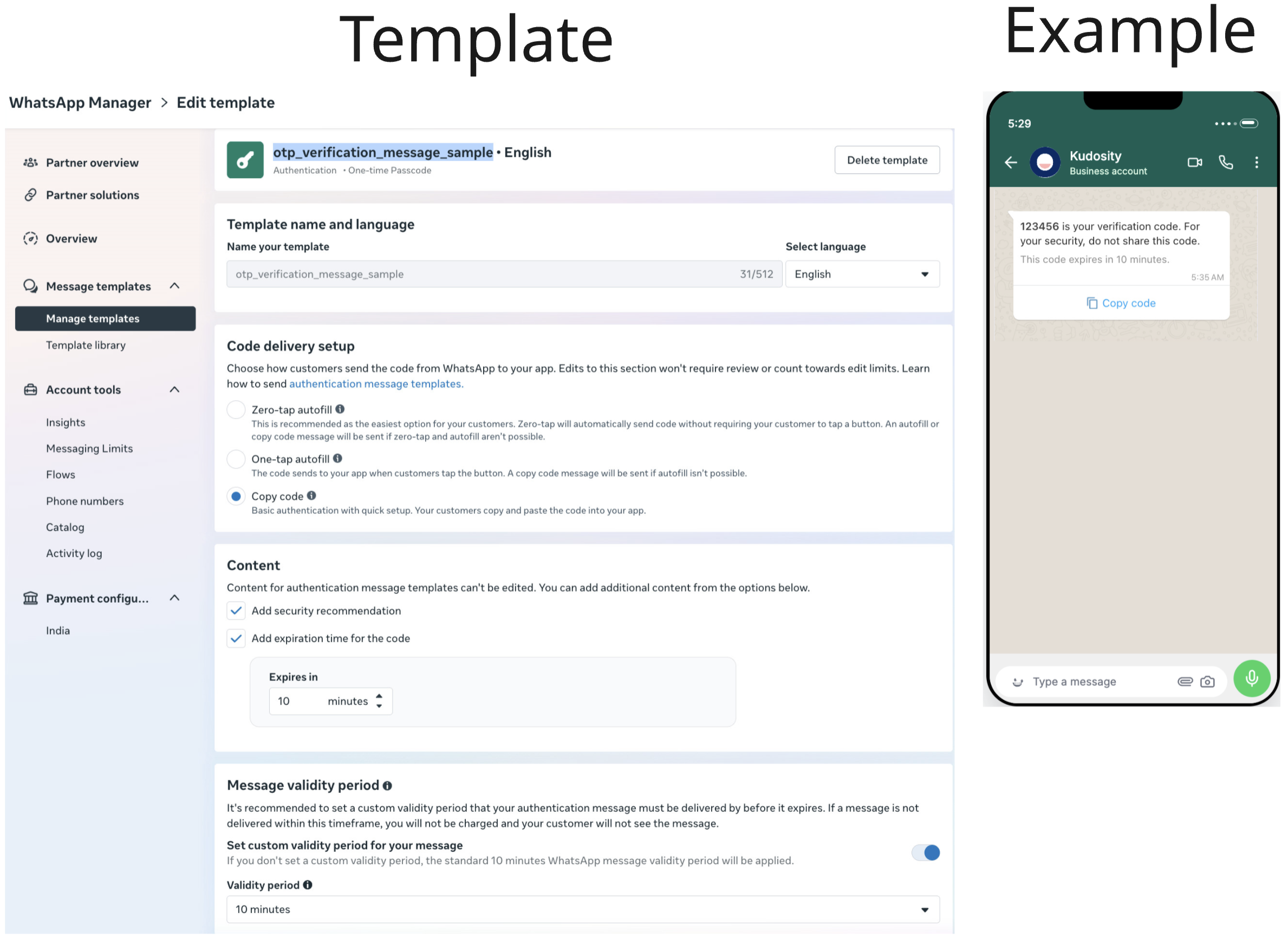
Authentication templates are used strictly for OTP codes and follow Meta's mandated structure.
Restrictions
- No URLs
- No emojis
- No media
- No additional marketing or utility content
- Must include the OTP placeholder as
{{1}}
Example (Authentication Template)
{
    "sender": "1111111111",
    "recipient": "+2222222222",
    "content_type": "custom",
    "content": {
        "custom": {
            "type": "template",
            "template": {
                "name": "otp_verification_message_sample",
                "language": {
                    "code": "en",
                    "policy": "deterministic"
                },
                "components": [
                    {
                        "type": "body",
                        "parameters": [
                            {
                                "type": "text",
                                "text": "1234"
                            }
                        ]
                    },
                    {
                        "type": "button",
                        "sub_type": "url",
                        "index": "0",
                        "parameters": [
                            {
                                "type": "text",
                                "text": "1234"
                            }
                        ]
                    }
                ]
            }
        }
    },
    "message_ref": "ref-otp-working-solution"
}
Service Messages (Not Templates)
Technical format: content_type: "text"
Service messages are used for customer‑initiated conversations only.
They are free‑form and allowed only within the 24‑hour window.
Example
{
  "sender": "1234567890",
  "recipient": "+12345550123",
  "content_type": "text",
  "content": {
    "text": {
      "message": "Thanks for reaching out. How can I help?"
    }
  },
  "message_ref": "service-012"
}
Updated 10 months ago